The Sandbox Wars
Preface
Zero-days are the new normal.
LiteLLM, Copilot extensions, supply chain attacks on npm and PyPI: the pace of vulnerabilities hitting developer tooling is accelerating. And it's not just humans finding them anymore. At Unprompted this year, Nicholas Carlini demonstrated something that stuck with me: he pointed Claude at a codebase and asked it to find vulnerabilities. It did, and it was better at it than most human security researchers.
The implication: the moment code is out there: open source, a leaked repo, a misconfigured server: the vulnerability is already found. Not by a human reading through it over weeks, but by an agent scanning the entire codebase in minutes. The window between "code exists" and "vulnerability is known" is collapsing to near zero.
At this point, I assume my machine is almost always compromised. Not because I'm paranoid: because the math doesn't work. There are too many packages, too many extensions, too many things running with too much access. The question isn't if something gets in, it's what it can reach when it does.
So how do you let an AI agent run code on your machine and still sleep at night? That's what this post is about.
The Two Surfaces
Every isolation approach: from a simple sandbox to a full cloud VM: boils down to two things:
- Filesystem: what can the process read and write?
- Network: what can it talk to?
That's it. Every attack either exfiltrates data (reads files, sends them somewhere) or persists access (writes files, modifies configs, installs backdoors). If you control these two surfaces, you control the blast radius.
A note on scope: once you start connecting credentials to tools: MCP servers, cloud providers, email, Slack: the isolation picture gets significantly more complicated. What can an agent do with your GCP service account? Your GitHub PAT? That's a different (and important) post. Here, I'm talking only about the machine itself as both the source and target: protecting the filesystem and network of the box the agent runs on.
Both surfaces are traceable at the syscall level. Filesystem access goes through open, read, write, unlink. Network access goes through connect, sendto, recvfrom. A well-configured isolation layer intercepts these syscalls and enforces policy: either by filtering them (sandboxing) or by running them in a separate namespace entirely (containerization/virtualization).
This mental model is useful because it cuts through marketing. When someone says "isolated," ask: what filesystem can it see, and what network can it reach? If the answer is vague, the isolation probably is too.
The Isolation Spectrum
Not all isolation is created equal. Here's the progression from weakest to strongest:
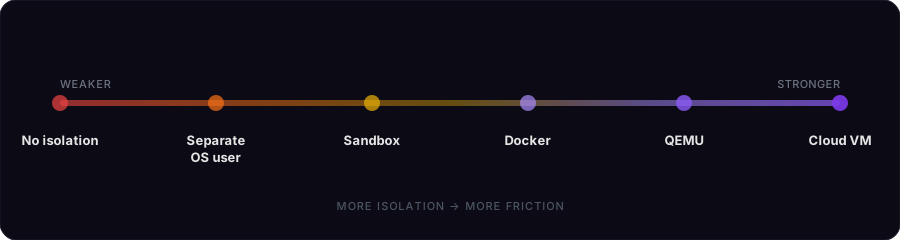
Each level adds protection: but also friction. The right choice depends on your threat model, not a "more is better" rule.
| Approach | Filesystem isolation | Network isolation | Kernel isolation | Effort |
|---|---|---|---|---|
| Separate OS user | Partial: own home dir, but same FS | None | None | Low |
| Sandbox (Seatbelt) | Strong: writes limited to project dir | Strong: proxy-based, prompt on new domains | None | Minimal |
| Docker container | Full: separate mount namespace | Full: separate network namespace | None (shared kernel) | Low |
| QEMU VM | Full | Full | Yes: separate kernel | Medium |
| Cloud VM | Full | Full | Yes: separate hardware | Medium + cost |
The key insight: each layer up protects against a different class of failure. A separate user stops accidental credential leaks. A sandbox stops unauthorized filesystem/network access: whether from a malicious dependency, a prompt injection, or the agent itself. A container adds full namespace isolation. A VM adds kernel isolation. A cloud VM moves the risk to someone else's hardware entirely.
If you can't name the specific class of attack you're protecting against by adding a layer, you probably don't need it.
Separate OS User
The simplest thing you can do. Create a dedicated macOS user for your agent work: it gets its own home directory, no access to your files, no credentials. Run your agent as that user, and your SSH keys, .env files, browser cookies, 1Password sessions, Keychain: all out of reach.
This is sometimes more than enough. For a lot of workflows, "keep my credentials away from the agent" is the actual threat you care about.
But there are gotchas. A separate user still shares the same kernel, the same filesystem (world-readable files are still readable), and crucially: the same network. There's no real isolation boundary. And if you're not careful, you might have an open file descriptor, a Unix domain socket, or a Mach port that bridges the gap between users in ways you didn't expect. It's a speed bump, not a wall. Know what it covers and what it doesn't.
Anthropic's Built-in Sandbox
Before reaching for Docker, it's worth understanding what Claude Code's built-in sandbox actually does. You enable it with the /sandbox command inside Claude Code. It's better than most people think.
On macOS, it uses Seatbelt (same tech behind App Store sandboxing). On Linux, bubblewrap. Both enforce at the OS level: all subprocesses inherit the restrictions. Writes are limited to the working directory. On the network side, all traffic goes through a proxy: when a process tries to reach a new domain, the sandbox blocks it and prompts you to allow or deny. Nothing gets through silently.
The tradeoff: it's someone else's policy, not yours. You have less control over the defaults, and the sandbox runs on your machine with no namespace boundary.
And sandboxes can fail in ways you don't expect. NVIDIA's NemoClaw was supposed to be sandboxed:
Turns out it could modify its own config! changing its auth token to something trivial, opening websocket connections from any origin. Any site you visit could then give instructions to your bot. The isolation wasn't broken from the outside: the agent weakened it from the inside. (This was fixed, but the point stands.)
The lesson: verify your isolation, don't assume it. "It runs in a sandbox" is not a security property. "The sandbox denies all filesystem access except /project and all network access except through a filtered proxy" is.
Docker Containers
Docker gives you what a separate user and a sandbox can't: full namespace isolation. Separate mount namespace (its own filesystem), separate network namespace, separate PID namespace. The agent literally cannot see your host files or processes.
FROM node:20

RUN npm install -g @anthropic-ai/claude-code
RUN apt-get update && apt-get install -y git curl
docker build -t claude-dev .The container has its own root filesystem: your home directory, SSH keys, Keychain don't exist inside it. Kill it and nothing persists. Network is a separate namespace too: you can lock it down with docker network disconnect or restrict it to specific endpoints.
But namespaces aren't everything. Remember that Seatbelt blocks syscalls directly: unauthorized open, connect, write simply fail. A container gives the process a separate view, but inside that view it can make any syscall it wants. What Docker gives you over a sandbox isn't stronger enforcement, but a full environment isolation that you control and configure.
The tradeoff: Docker containers share the host kernel. On macOS this is nuanced: Docker Desktop actually runs a hidden Linux VM, so there is a kernel boundary. But the Docker daemon still runs on your host with broad access, the VM is managed by Docker (not you), and the attack surface includes the Docker socket, the daemon API, and the VM's shared filesystem mounts. Container escape CVEs exist (CVE-2022-0185, CVE-2024-21626). They're not common, but CVEs are getting more common, not less.
Few words for the wise: if you bind-mount your home directory, pass through your SSH agent, mount the Docker socket, or run with --privileged, you just lost the plot.
QEMU (Local VM)
This is the step most people skip. QEMU gives you a real virtual machine with its own kernel, running on your Mac.
| Docker | QEMU | |
|---|---|---|
| Kernel | Shared (via Docker Desktop's hidden VM) | Separate: runs its own |
| Escape requires | Kernel exploit (happens occasionally) | Hypervisor escape (extremely rare) |
| Attack surface | Docker daemon + Linux kernel syscalls | Small hypervisor interface, hardware-enforced |
A Docker escape gives you access to the Docker Desktop VM (and from there, potentially the host). A QEMU escape requires breaking through Apple's Hypervisor.framework: hardware-enforced virtualization. These vulnerabilities exist but they're top-tier zero-days, nation-state level, not "rogue npm package" level.
On macOS, QEMU uses Apple's Hypervisor.framework: a native hardware virtualization API built into macOS (think KVM on Linux). QEMU is the VM manager, Hypervisor.framework is the engine that runs it at near-native speed. This is arguably cleaner than Docker Desktop, which runs its own hidden Linux VM anyway. With QEMU you run one VM you control.
UTM makes this easy on macOS. The killer feature is snapshots: save the entire VM state before the agent starts, restore in seconds if something goes wrong. The tradeoff is friction: slower boot, dedicated RAM, scp instead of docker cp.
Cloud VM
As Simon Willison puts it: "The only solution that's credible is to run coding agents in a sandbox": and ideally, "the best sandboxes run on someone else's computer."
A cloud VM is the nuclear option. Separate hardware, separate datacenter, separate everything. If the agent nukes it, terminate the instance and launch a new one. Your machine is untouchable: even a hypervisor escape lands on the cloud provider's infrastructure, not your laptop.
SSH in, run your agent inside tmux (survives disconnects), close your laptop, walk away. Come back whenever. This is the right call for long-running autonomous tasks, maximum isolation, or running multiple agents in parallel.
Takeaways
- Name your threat before picking a layer. If you can't say what class of attack you're protecting against, you probably don't need it.
- A well-configured sandbox can be stronger than a misconfigured container. A container with
--privilegedis worse than no container at all. - Each layer is insurance against the layer below having a bad day. A sandbox escape doesn't matter inside a container. A container escape doesn't matter inside a VM.
- That insurance has a cost: complexity, friction, debugging difficulty. Pick the minimum that covers your threat model.
My Setup
I don't always do the same thing. It depends on the day and what I'm working on.
When working on oss projects, I just run claude in a container on my macbook. It's genuinely good isolation for that use case, and the friction is zero.
The process I use is more or less like this:
FROM node:20
RUN npm install -g @anthropic-ai/claude-code
RUN apt-get update && apt-get install -y git curl
I mount the project directory directly into the container, but I'm careful about what gets mapped. Dotfiles are the danger zone: .env, .git, .ssh, .aws, .npmrc: these are credentials and config that have no business inside a container. I use a .dockerignore-style approach with a simple wrapper:
# Shadow all dotfiles, then mount back .claude so the agent has its config
HIDE=$(ls -A | grep '^\.' | xargs -I{} echo -v /dev/null:/work/{})
docker run -dit --name work -v $(pwd):/work $HIDE -v $(pwd)/.claude:/work/.claude claude-dev
The bind mount gives me live file access: changes the agent makes show up on my host immediately. The HIDE line shadows all dotfiles (.git, .env, etc.) with /dev/null so they're invisible inside the container. The last -v mounts .claude back in so the agent still has its config.
--dangerously-skip-permissions sounds terrifying on bare metal, but inside a container with no credentials and no secrets, the worst it can do is mess up your working tree: and you have git for that.
For private repos, network access is a real risk: the agent could curl your code somewhere. So for private work I'm experimenting with a locked-down Docker network that only allows traffic to Anthropic's API: the agent can talk to the model but nothing else. Still early days on that one.
When I'm done, the changes are already on my host. All is left is review & push.
For longer jobs I spin up a cloud VM and run it there. SSH in, tmux, let it work, come back later. Different tool for a different job.
Is Docker perfect? No. The shared kernel is a real limitation, and container escape CVEs do happen. But for my day-to-day, it's the sweet spot I chose between friction and safety.